Tuoni 0.17.0
New Agents UI, Richer Agent Context, Windows Administration
Overview
Tuoni 0.17.0 introduces a redesigned Agents UI with flexible filtering and visibility into inactive and blocked agents. Richer agent context, new Windows network, registry, and service commands, v2 authentication with refresh tokens, and lower overhead round out the release.
New Agents UI
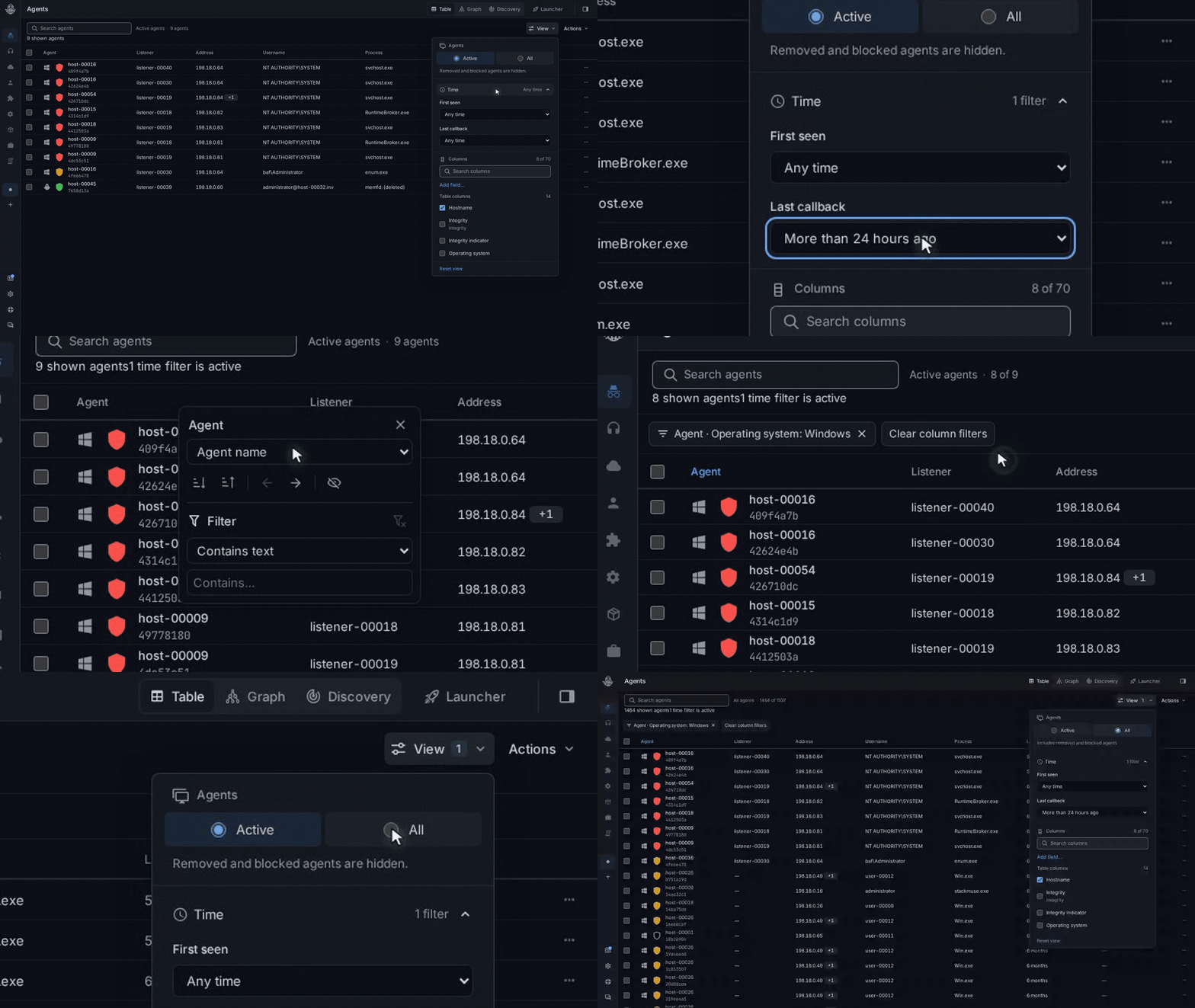
The redesigned Agents table makes it easier to find the agents you need. Combine search with time filters such as Last callback, or right-click a column header to filter by attributes such as operating system. Visible filter chips show what is narrowing the table and let you clear individual filters.
Open View and choose All to include inactive, removed, and blocked agents alongside active ones. Status indicators and callback information help you see each agent's state. Switch back to Active to focus on the current operation.
Switch Back to Classic
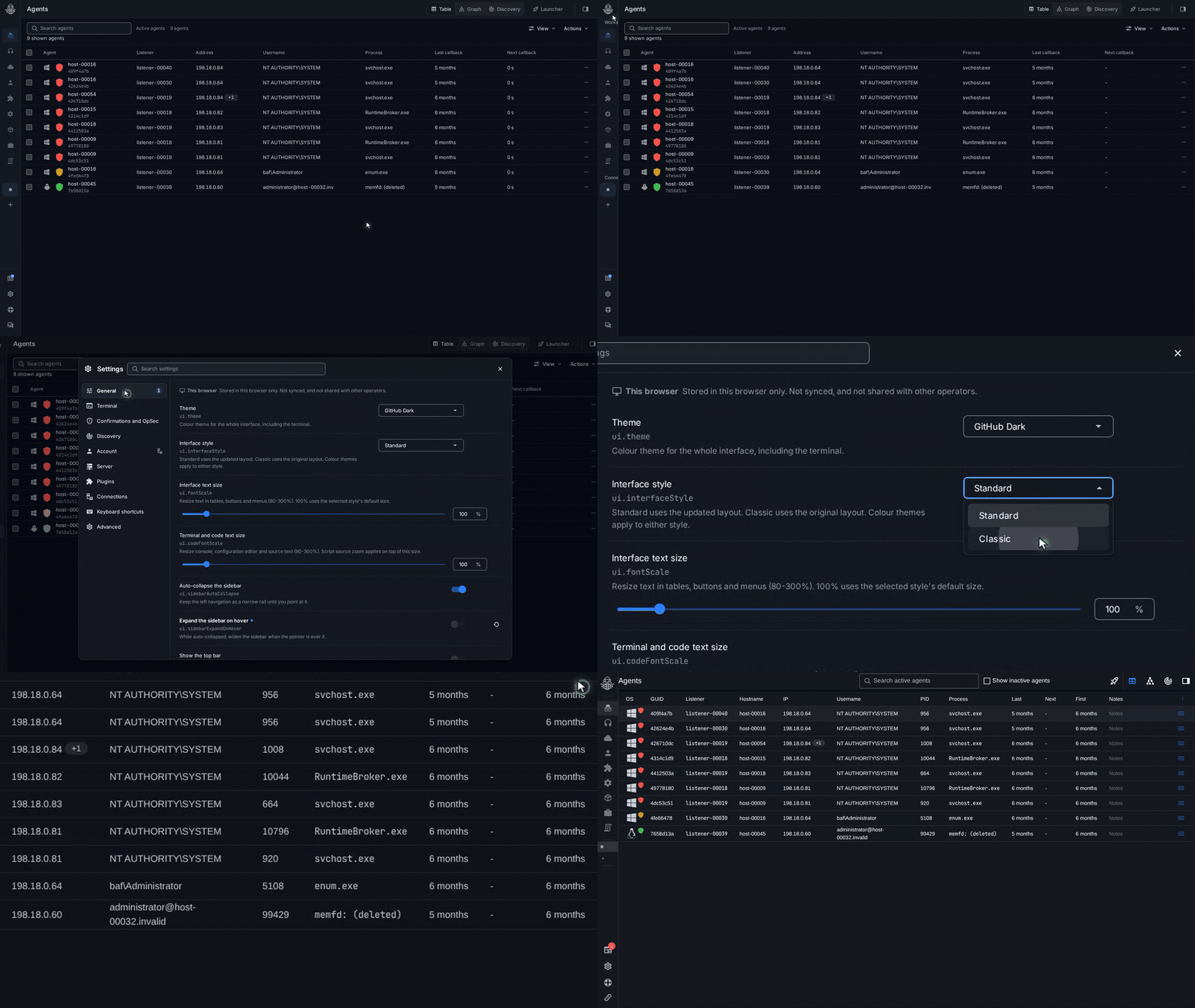
The previous layout remains available. Open Settings → General → Interface style and choose Classic. Choose Standard whenever you want to return to the new interface.
Richer Agent Context
Network addresses are now grouped by interface, helping you understand how an agent connects to the networks around it. Default Windows agents report MAC and IPv4 data for active interfaces. Commercial Windows, Linux, FreeBSD, and macOS agents can also report IPv6 addresses and interface names when enabled.
Commercial payloads gain control over which optional metadata fields an agent collects and reports. Choose the fields when generating a payload, then use metadata-fields-report, metadata-fields-enable, and metadata-fields-disable to inspect and adjust them while the agent runs. IPv6 and interface names are opt-in; runtime changes reset to the generated settings after a restart.
See Agent Metadata Controls for defaults, supported selectors, and examples.
Windows Network, Registry, and Service Commands
The new netinfo command collects interfaces, routes, neighbors, connections, listening endpoints, and DNS configuration. You can focus on a particular section, filter by IPv4 or IPv6, and optionally save eligible neighbors and local listening endpoints to Discovery.
The reg-* commands bring registry browsing, reading, searching, editing, deletion, and copying into the same workflow, with explicit 32-bit and 64-bit registry views. The svc-* commands let you inspect and manage services on the agent's local Windows machine, including their configuration and running state.
These additions are part of the standard plugin command set, with compatible managed and native implementations selected for the connected agent. The Windows command guide covers parameters and read-only examples.
V2 Authentication with Refresh Tokens
The v2 authentication API adds refresh tokens so your integrations can renew access without logging in again. Logout ends the refresh session, and v1 login remains available for compatibility. See the authentication guide for details.
Lower Overhead and Better Reliability
Server and Python script startup do less work, runtime memory use is lower, and plugin operations hold database locks for less time. Live updates preserve their order while delivering completed command results promptly, and startup recovery handles large pending-command queues more reliably. Commands that cannot be delivered are canceled after permanent delivery failure or exhausted retries.
SOCKS5 forwarding improves upload throughput over HTTP and handles backpressure more efficiently. HTTP request handling and reverse-shell output are more reliable, including fragmented UTF-8 output and pending results during shutdown. Stored-file recovery also protects file contents after interrupted updates or transaction rollback.
Upgrading from 0.16.1
For custom deployments and integrations, review these changes before upgrading:
- Authentication: Both login API versions require Basic credentials. Use v2 login and refresh for renewable sessions, and reconnect custom WebSocket clients when their access token expires.
- Browser origins: When the browser client uses a separate origin, configure its exact trusted origin through
tuoni.websocket.allowed-origins. The authentication guide includes a configuration example.
Community
Join our Discord community to ask questions, share feedback, and connect with other Tuoni users.
Find release artifacts and changelogs on GitHub.