Discovery
Discovery is what the operation has learned about the network it is in: hosts, the services on them, and the credentials recovered so far. It is filled in by agents and by discovery commands, and it is shared - what one operator finds, everyone sees.
There is no entry for it in the navigation rail. Reach it from the Discovery button on the Agents toolbar, from the side panel, or from the command palette. That is deliberate: discovery is nearly always consulted while working on an agent, so it is offered where the agent is rather than as a page you navigate away to.
Hosts
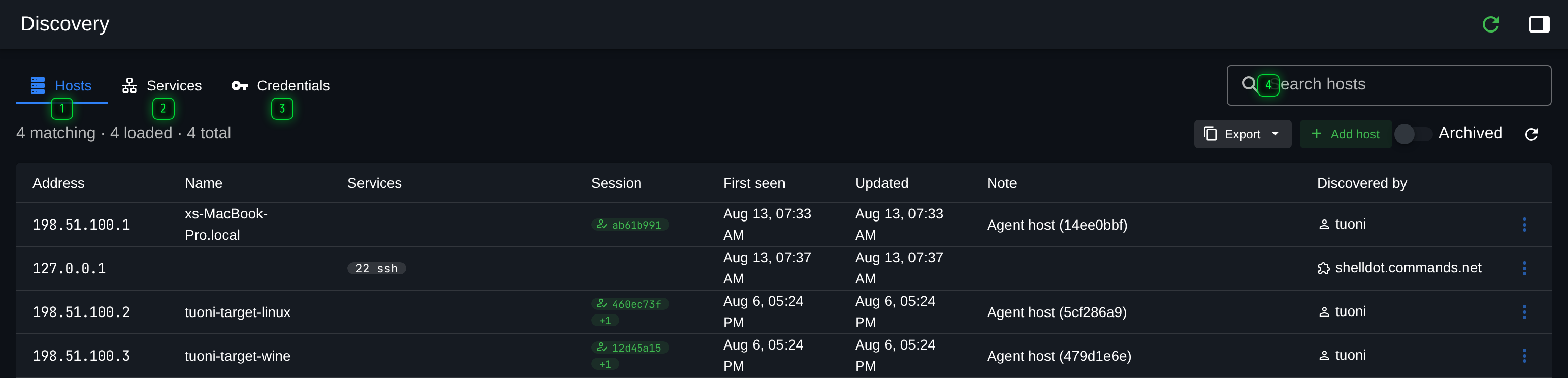
- Hosts - machines seen on the networks the agents can reach
- Services - open ports found on those hosts, with whatever the scan could identify
- Credentials - credentials recovered so far, and where each one came from
- Search - filters the table in view. On Credentials it searches the secrets too, so it is never seeded from the URL
One row per host, with the addresses it is known by, the name if one was resolved, and a summary of the services found on it. Hosts appear here when an agent checks in from them, when a scan finds them, and when they are added by hand.
The row menu is where a host is worked with: adding a service or a note, marking it archived when it turns out not to matter, or jumping to the agents that came from it.
Services

Open ports, with whatever the scan could identify about them. This is the tab to search when the question is "where else is SSH open", rather than "what do we know about this box".
Credentials
Credentials recovered during the operation, with where each one came from.
This tab searches its own secrets, which is why a term typed here is never put in the URL and never restored from one: a link to a search of your credentials is a link that leaks them. The other two tabs do keep their search in the URL, so a filtered view of hosts or services can be shared with a colleague.
Getting data in and out
Export writes the tab in view to a file, respecting the current filter, which is the usual way discovery data reaches a report.
Data arrives from three directions:
- Automatically, from agents checking in and from commands that report what they touched.
- From scans, such as the port scan commands, which write their results straight here rather than only into the console output.
- By hand, with Add host and the row actions, for anything learned outside Tuoni.