Users
Accounts and what each one is allowed to do. Everything on this page needs the Manage Users permission, which is why most operators never see it.

- Search - filters the cards by username
- Show disabled - includes accounts that have been disabled
- Add user - creates an account
- Refresh - re-reads the accounts from the server
Each account is a card. Disabled accounts are hidden by default, so an account that seems to be missing is usually disabled rather than deleted.
A user card
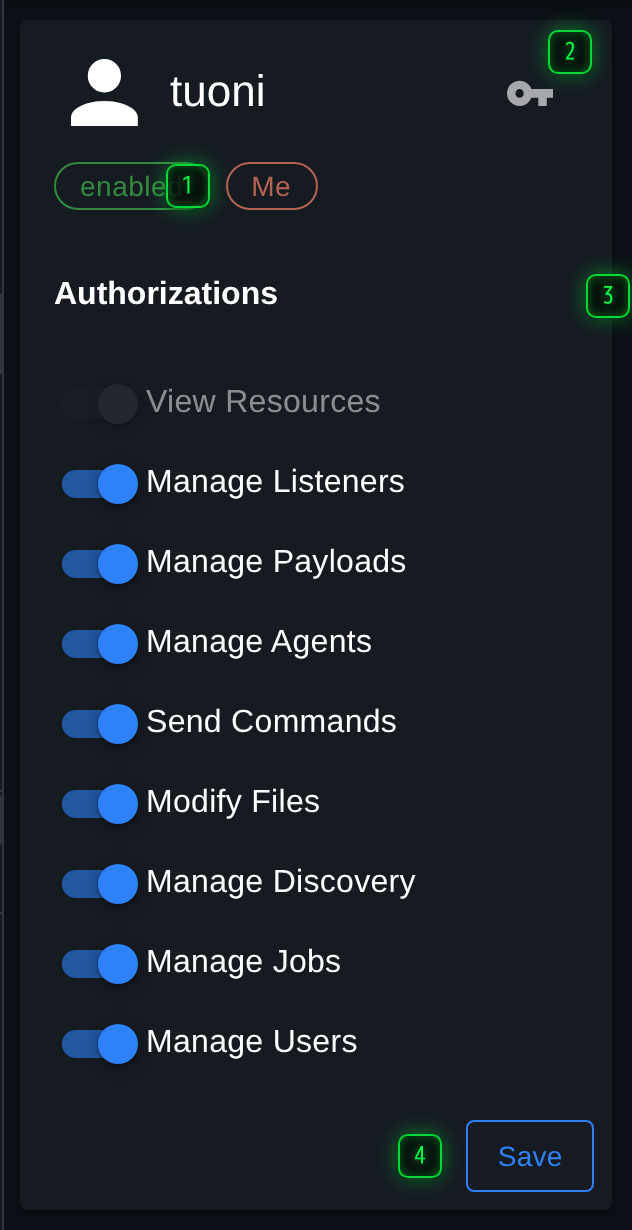
- Enabled - click the chip or the avatar to disable the account; a disabled account cannot log in
- Change password - sets a new password for this account
- Authorizations - what the account may do. Each switch is one permission, and they take effect when saved
- Save - writes the permission changes back. Nothing on the card takes effect until this is pressed
Nothing on the card takes effect until Save is pressed, which is deliberate: granting three permissions is one decision, not three.
Permissions
Every permission is independent, and the GUI enforces exactly what the server does - a user without a permission does not see a disabled button, they get an interface without that action in it.
| Permission | Allows |
|---|---|
| View Resources | Read access to the server's data. Without it an account can log in and see very little |
| Manage Listeners | Create, start, stop and delete listeners |
| Manage Payloads | Build and delete payloads |
| Manage Agents | Rename, note, block, kill and remove agents |
| Send Commands | Run commands through agents. This is the one that separates an observer from an operator |
| Modify Files | Upload files and change what is hosted |
| Manage Discovery | Add and edit hosts, services and credentials |
| Manage Jobs | Start and stop long-running work, including scripts |
| Manage Users | Create accounts and change permissions, including their own |
Manage Users is the one to be careful with: an account that has it can grant itself anything else.
Enabling and disabling
The chip on the card, and the avatar beside it, toggle whether the account may log in. A disabled account keeps its permissions and its history, and stops being able to connect - which is the right thing at the end of an engagement, where deleting the account would also remove the context for what it did.
Passwords
The key action on a card sets a new password for that account. There is no self-service reset: somebody with Manage Users does it. Your own password is changed from your profile rather than from here.