Menu
The navigation rail runs down the left of every page. It is collapsed to icons by default and opens when the pointer crosses it, so the width goes to whatever you are working on rather than to a permanent list of section names.
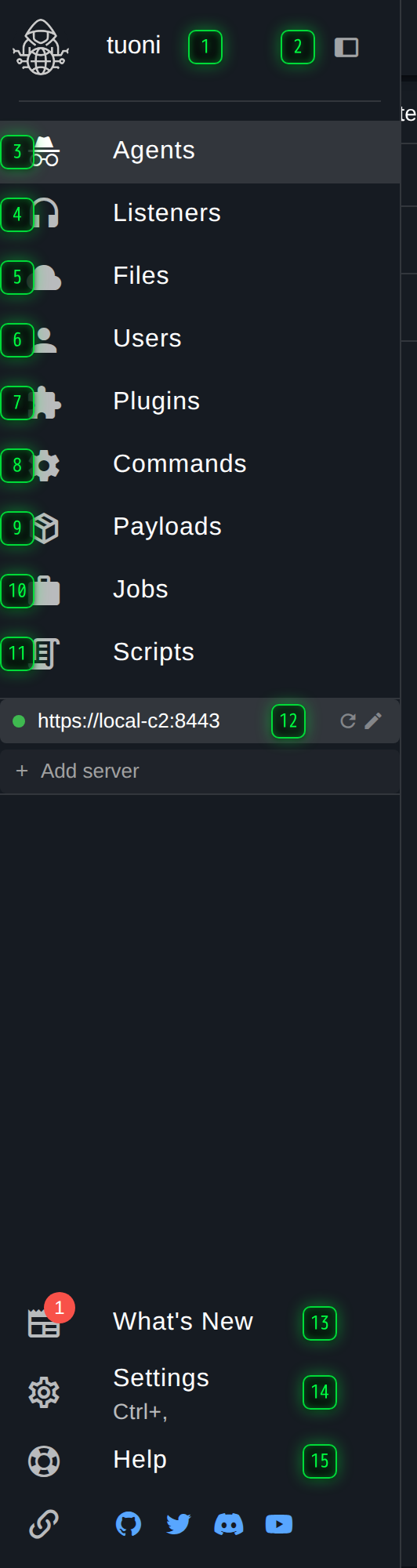
- Identity - the signed-in operator. Opens the settings dialog
- Pin open - keeps the rail expanded instead of letting it collapse back to icons when the pointer leaves
- Agents - the agent table, the graph, and the consoles
- Listeners - the listeners agents call back to
- Files - uploaded files, and the ones hosted over HTTP
- Users - accounts and their permissions
- Plugins - what this server has loaded
- Commands - the command catalogue and your aliases
- Payloads - the generator, and everything built with it
- Jobs - long-running work and its output
- Scripts - server-side scripts and what they have produced
- Connections - every C2 this client is connected to, with its live state. More than one can be open at a time
- What's New - release notes for the version you are connected to
- Settings - client settings, searchable, also on Ctrl+,
- Help - documentation and the API reference for this server
Collapsed, expanded, pinned
Three states, and the difference matters if you work at a narrow window:
- Collapsed - 56 pixels of icons. The default.
- Expanded on hover - the rail opens while the pointer is over it and closes when it leaves. It does not push the page across; it opens on top of it.
- Pinned - the toggle at the top of the rail keeps it open. The page is laid out beside it, so this costs real width.
Expand-on-hover can be turned off in Settings, which leaves the rail either collapsed or pinned.
Connections
Every server this client is connected to has a row near the bottom of the rail, with a live dot for its connection state and its own actions for editing, reconnecting or removing it. Selecting a row switches the whole client to that server. Add server connects to another one without disturbing the first.
This is why the pages do not name a server: whichever connection is selected is the server every page is showing.
Discovery is not in the rail
Hosts, services and credentials do not have a rail entry. They are reached from the Agents page, from the side panel, or from the command palette - see Discovery. The rail lists the sections that are pages in their own right.
Getting there without the mouse
Anything in the rail can also be reached from the command palette on Ctrl+K, which searches pages, settings, agents and actions in one list. See Settings.